Model dropdown not populating despite valid /v1/models response #4
 wagesj45


Loading…
Reference in a new issue
No description provided.
Delete branch "%!s()"
Deleting a branch is permanent. Although the deleted branch may continue to exist for a short time before it actually gets removed, it CANNOT be undone in most cases. Continue?
The options page model dropdown shows no models even though the endpoint is returning a valid response. LM Studio server logs confirm /v1/models is being hit and returning correct JSON:
2026-04-26 10:15:49 [DEBUG]
Received request: GET to /v1/models
2026-04-26 10:15:49 [INFO]
Returning {
"data": [
{
"id": "llama-3-13b-instruct",
"object": "model",
"owned_by": "organization_owner"
},
{
"id": "text-embedding-nomic-embed-text-v1.5",
"object": "model",
"owned_by": "organization_owner"
}
],
"object": "list"
}
The server receives the request and returns the correct data but the dropdown remains empty. Appears to be a client-side parsing issue in the options page.
Base URL used: http://localhost:1234
LM Studio version: 0.4.12
Thunderbird version: 150.0
Sortana version: 2.4.3
Failed to apply AI rules
4/26/2026, 9:50:09 AM
Message not found: 607379.
Failed to apply AI rules
4/26/2026, 9:10:02 AM
Message not found: 607348.
So I triaged, and I'm not able to reproduce the issue locally. It's possible that you're running into a CORS issue with LM Studio. But it is hard to tell with no logging from Sortana. Unfortunately, Sortana doesn't really have logging around the model listing code path. I've added logging to Sortana in the attached build. It would be very helpful if you could enable debug logging in Sortana > Settings > Advanced > Enable debug logging, open the Developer Tools [Ctrl + Shift + I], and hit the "Refresh" button next to the model drop-down. That logging would be very helpful in tracking down what the issue might be.
I have exactly the same issue. See here the logs from LM Studio:
Server settings:
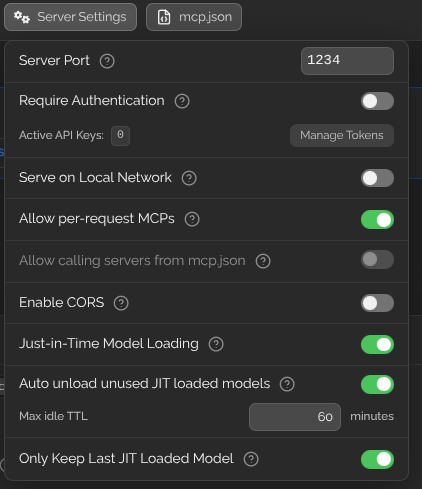
Logs:
@redbullpeter Have you tried this with CORS turned on in LM Studio? I noticed this in your logs:
Cross-Origin Request Blocked: The Same Origin Policy disallows reading the remote resource at http://127.0.0.1:1234/v1/models. (Reason: CORS header ‘Access-Control-Allow-Origin’ missing). Status code: 200.I'm having the same exact issue but with Ollama. Feels like it has something to do with the openai endpoint styling. May be expecting a different response shape than Ollama is returning for the endpoint it is calling.